← Back to guide overview


Chapter 01: Initiating

Define Why and Set Direction

Projects start long before the first line of code. They begin with something abstract — a problem, a frustration, a new technology everyone is obsessed about, a vision of how things could work better. But abstract ideas don't build themselves. Someone has to turn them into something a team can actually work on.

That's what Initiating is. It's where an idea gets enough shape and reality-checking to survive contact with real constraints. It's where a project's most basic questions get asked. And finding honest answers to them often requires more effort than it might seem.

👌  When done well
Everyone on the team starts off with a shared purpose and realistic expectations about what can be achieved.
💔  If skipped
Projects can lose direction — teams rush toward unclear goals. The further they go, the more expensive the misalignment becomes.
⁉️
HOW IT WORKS

How an idea turns into a project

An idea becomes a project when people agree it's worth pursuing. Three things make that possible.

01
Define the problem first
The solution often starts shaping the conversation before the actual problem is fully understood. Start with the outcome you want to achieve and the problem behind it. Otherwise, the team may build something technically impressive that never creates real value.
02
Choose the right solution
An idea only survives if it can work in reality. Explore different approaches before committing to the first obvious solution. Look at constraints like time, budget, compliance, security, scalability, existing systems, and team capabilities. Sometimes the most exciting solution can't survive the environment around it.
03
Align people early
Projects are shaped by the people around them as much as by the technology itself. Identify who is affected, who makes decisions, who can block progress, and what success means from different perspectives.
SEE IT IN PRACTICE

When Initiating works

It started with a short note from a leadership meeting:

“We invested heavily into AI for customer support last year, but it still feels slower than it should. We need to fix this.”

Over the following weeks, the conversation became a bit too passionate.

One person pushed for agentic workflows. Another suggested replacing the existing chatbot. Someone wanted to buy a newer support platform with built-in copilots and RAG search. Visible AI progress would look good on a quarterly meeting.

IT blamed the legacy systems.

The customer support lead carefully pointed out that reps were still switching between multiple systems to validate answers, and that a more unified interface would probably help.

Lina, the project lead, could already see the risk: too many solutions, no shared problem.

🧠  Initiation starts with defining why the project exists — not what tool it uses.

Lina started small — short calls with a few support reps, their team lead, and someone from Operations. She brought a couple of engineers into the conversations to listen and to surface technical constraints early.

During one of the calls, Sam, a data engineer, noticed that most of the “missing context” reps complained about actually existed — it was just scattered across different internal systems that didn’t talk to each other:

  • Customer history lived in the CRM.
  • Known bugs were tracked in Jira.
  • Incident updates appeared in Slack threads.

AI-generated suggestions pulled fragments from some of those systems — but without enough context reps couldn't trust the answers.

That insight changed how the team defined the problem.

The real issue wasn’t “not enough AI” — it was the amount of manual work due to fragmented knowledge. That became their north star:

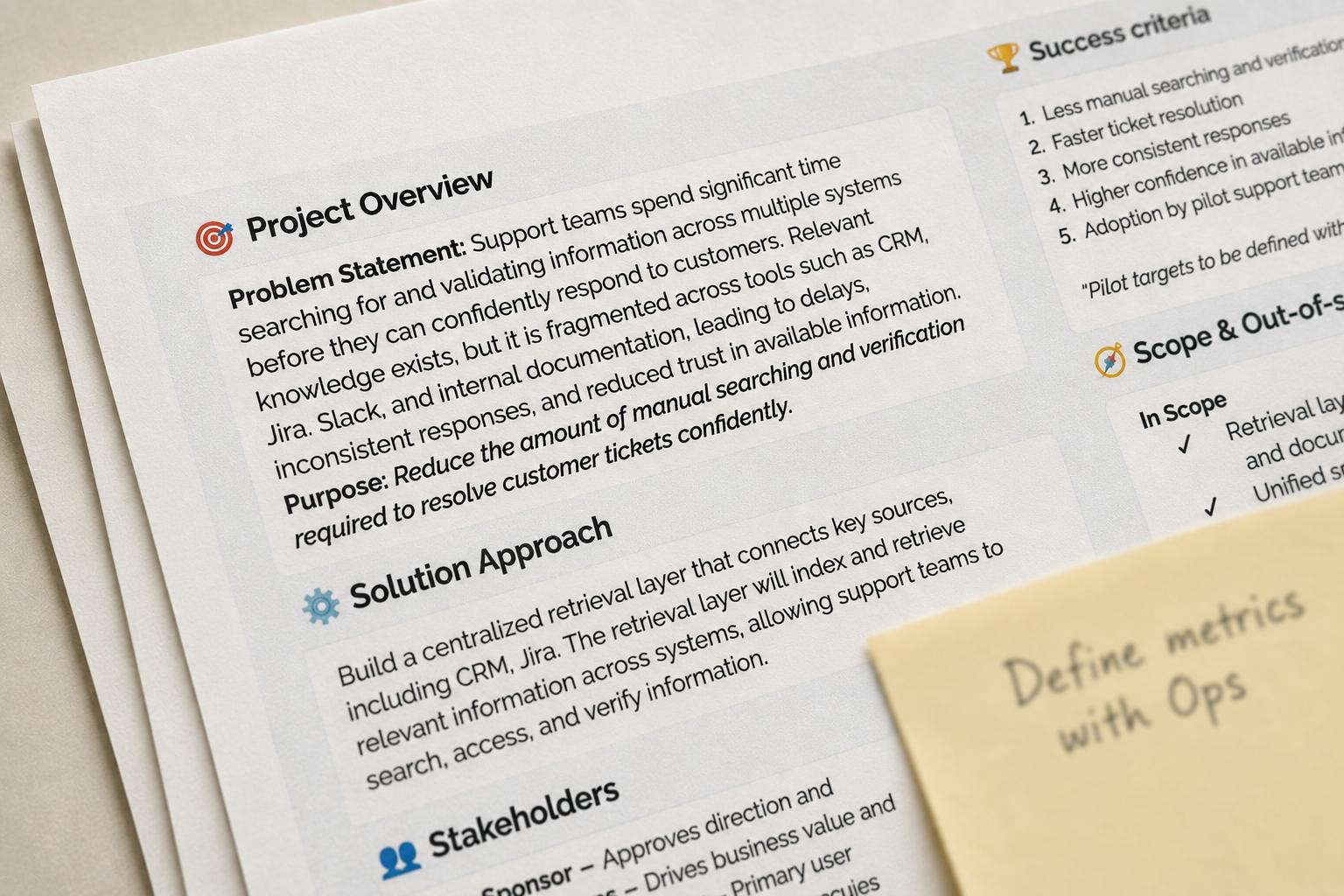
Reduce the amount of manual searching and verification required to resolve customer tickets confidently.

With the problem clearly defined, the team moved from understanding why to deciding how they could solve it.

Lina maintained a project snapshot for the Knowledge Assistant project and used it in every meeting to ensure the team shared the same understanding of the project's purpose, scope, and direction.

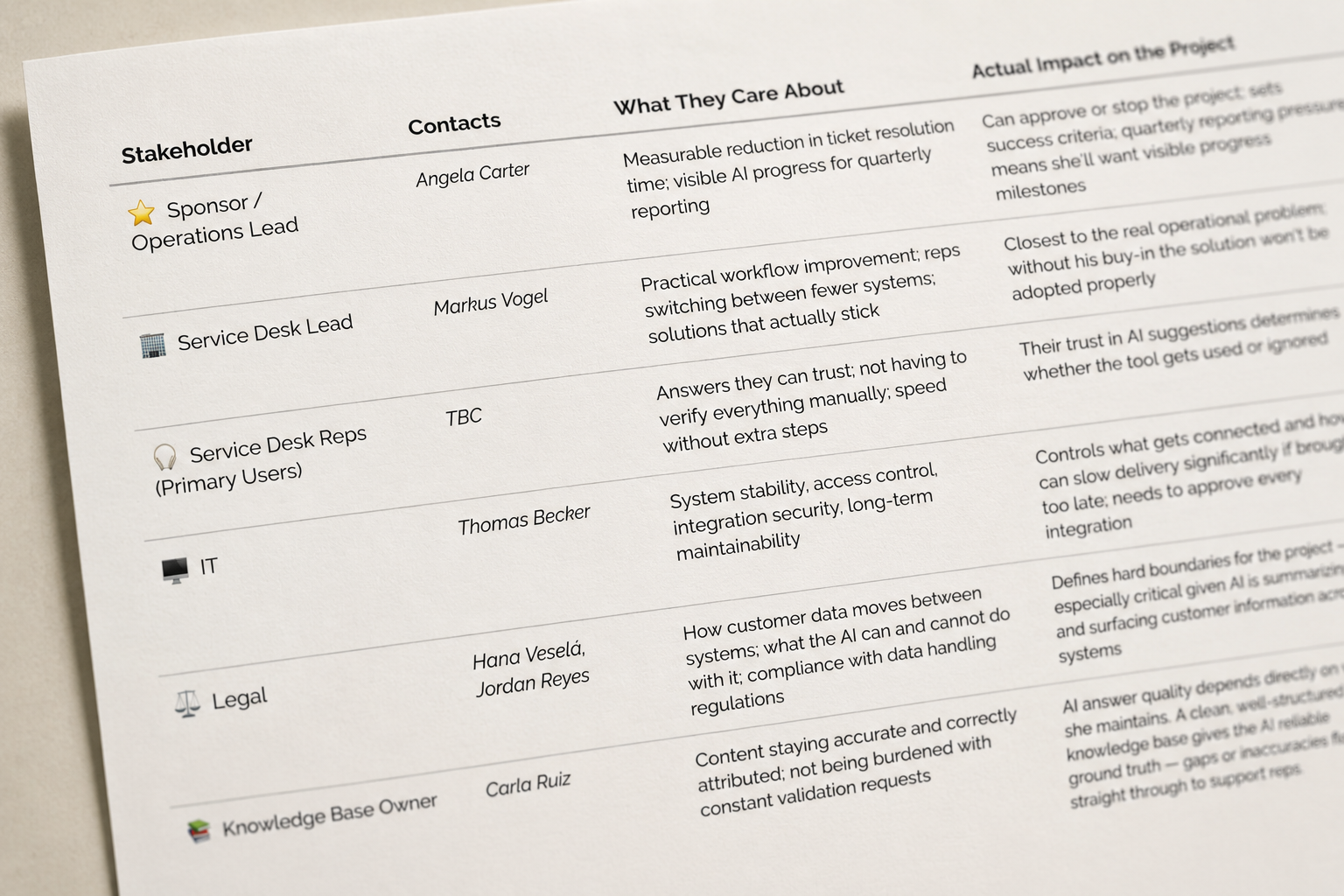
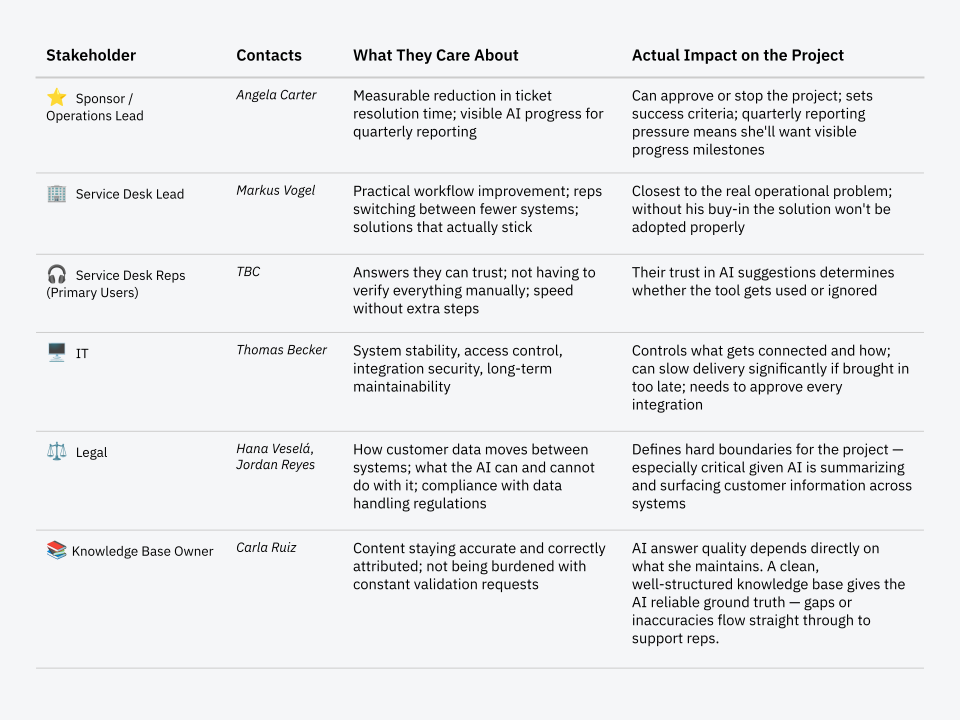
Team mapped stakeholders and what mattered to each: faster responses for Operations, compliance for Legal, reliability for IT, trust and usability for the reps.

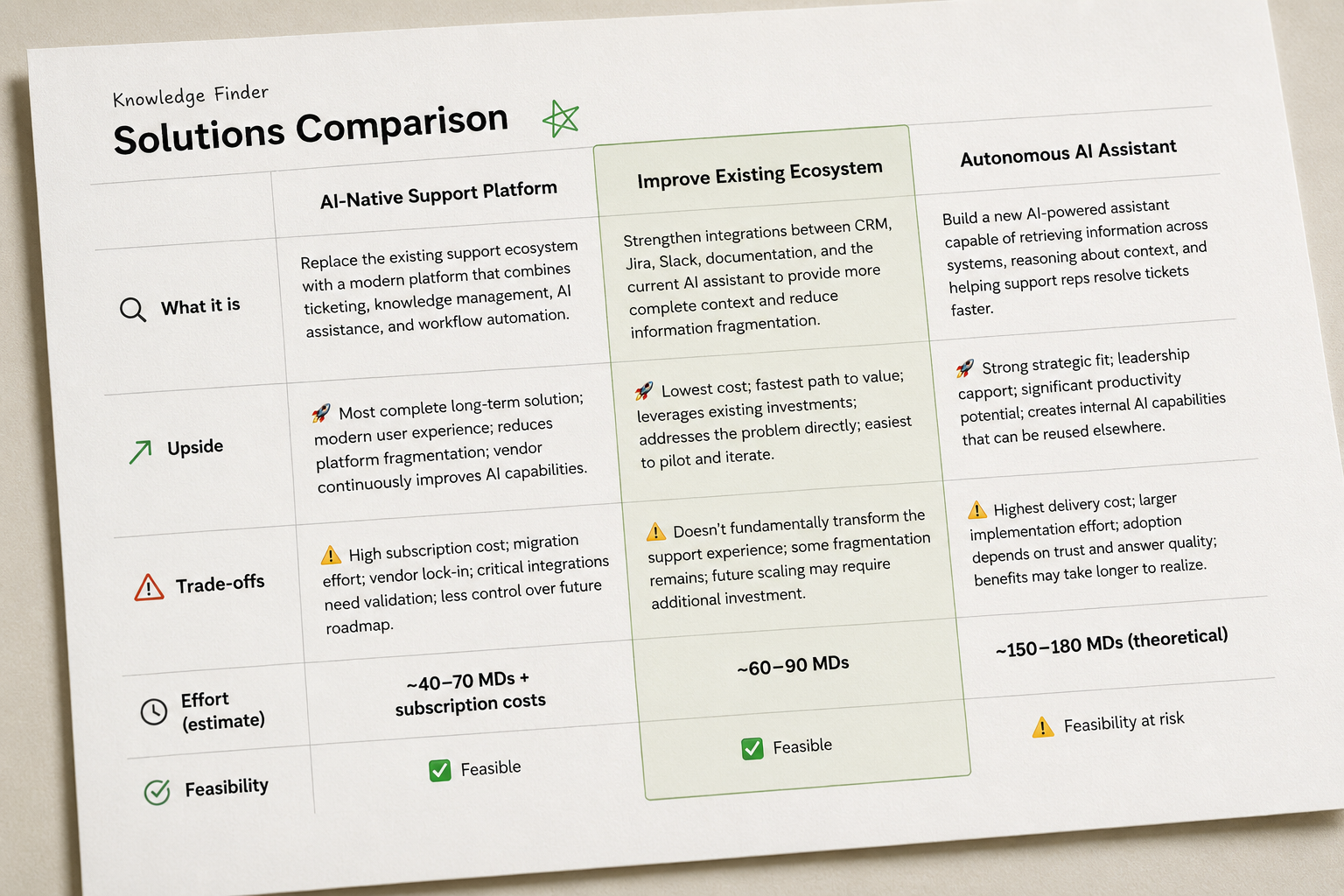
The team explored several directions:

  • replacing the current support platform with a newer AI-native solution,
  • rebuilding the assistant around more autonomous AI workflows,
  • or improving integrations and workflows between systems like Jira, Confluence, Slack, and the CRM.

They decided to start with a more practical approach: improving the existing AI assistant instead of replacing everything.

The plan was to connect additional systems — like Jira, Slack, and the CRM — so the AI could work with more complete context and reduce conflicting answers. Instead of fully automating support, the AI would summarize information and draft responses for support reps to review.

A few weeks into development, the team discovered that the AI sometimes generated confident answers based on outdated Slack workarounds or unresolved Jira tickets. Support reps quickly noticed the inconsistencies and started ignoring the suggestions altogether.

A few weeks into development, the team discovered that the AI sometimes generated confident answers based on outdated Slack workarounds or unresolved Jira tickets. Support reps quickly noticed the inconsistencies and started ignoring the suggestions altogether.

Instead of adding more automation and making it even more of a black box for support reps, the team remembered the project goal: reduce the amount of manual searching and verification required to resolve customer tickets confidently.

They shifted focus toward source visibility and confidence indicators — helping reps understand where information came from and when AI might be wrong.

It was a reminder that initiation isn’t a one-time step, but something that continues throughout the project.

Why It Worked?

What experienced teams do

Real Initiating rarely feels clean. There's uncertainty, pressure to move fast, and usually someone pushing a solution before the problem is even clear. What do experienced teams do differently?

01

Start with “why,”  not "what."
"To reduce manual searching" before "build an AI assistant." "To improve trust in AI responses" before "introduce scoring."

02

Explore more than one path.
Don't fall in love with the first idea that sounds good. Compare a few options, even briefly — even when leadership already seems to know what they want.

03

Start with the simpler solution
Ask: what's the simplest thing that could actually solve this? Simple solutions are often overlooked because of the pressure to look impressive.

04

Discover constraints early.
Even when raising concerns gets you labeled as negative or unsupportive. Constraints don't disappear if you ignore them, they just show up later, when fixing them costs ten times more.

05

Handle ambiguity as part of the process.
It'll never fully go away, so the goal is to reduce it just enough to make a decent decision and keep moving.

06

Get engineers into the room early.
They surface unrealistic expectations and hidden dependencies before they become expensive. And engineers who understand the business context build better solutions.

07

Talk to people involved.
A few honest conversations will tell you more than any document. It also builds trust that helps the project. In larger organizations, getting access to the right people takes effort. It's still worth it.

08

Treat initiation as ongoing.
Every new discovery is a small reason to pause and recalibrate. It's always better than protecting outdated decisions.

PRACTICAL TOOLKIT

Tools that bring clarity to Initiating

During Initiation, your goal is to bring clarity. These tools help you do exactly that: they make the problem visible, highlight constraints early, and align people before work begins. They’re not meant to become long-term documentation. Instead, they support early thinking and give your team just enough structure to make confident decisions.

Project Snapshot
A one-page snapshot that defines why the project exists, what problem it solves, and the boundaries that shape early decisions.
alignment
clarity
Solutions Comparison
A quick side-by-side look at the realistic ways you could solve the problem.
business value
constraints awareness
decision context
Stakeholder map
A clear view of the people who influence, contribute, or are affected by the project — and what matters to them.
stakeholder map
stakeholder understanding
constraints awareness
At Task Level

Even tasks need a “why”

Sam picked up a task from the backlog:
“Add Slack incident updates to the retrieval layer.”

At first glance, it seemed straightforward — pull messages from incident channels, map the fields, and make them searchable by the AI assistant.

Lina had recently introduced a simple rule:

Every task must start with a single sentence explaining its purpose.

So Sam opened the ticket and wrote:

“Give the AI more operational context.”

He stared at it for a moment. Is more context really better? From what I’ve seen, Slack incident threads are messy. What if indexing everything just increases the noise and makes the AI even less trustworthy?

The purpose suddenly wasn’t clear at all.

Sam realized he needed to understand the value before touching any code. From stakeholder discussion Sam knew there is a person — the Knowledge Owner — maybe she could advice. Sam reached out to her and she confirmed his suspicion: some incident channels contained useful temporary workarounds, but others were full of outdated fixes, conflicting suggestions, and unresolved discussions.

The task now looked very different.
There were stakeholders to consult and solutions to evaluate.

With a clearer picture, Sam compared two realistic options:

  • Index all incident channels.
    Fastest technically, but likely to introduce noisy or unreliable context into AI-generated answers.
  • Index only validated incident summaries and selected support channels.
    Slightly more effort, but much safer and easier for support reps to trust.

The right approach was obvious — but only after clarifying the purpose.

By pausing for a single sentence of purpose, Sam avoided building something that looked productive but delivered little value. He ended up with a task that was scoped correctly, aligned with real needs, and worth doing.

WHAT HELPS IN REAL WORK

Habits that prevent wasted effort

Initiating on tasks doesn't require heavy tools — just a few habits.

Pause and ask what the task is actually meant to achieve. If writing down the purpose makes you uncertain, stop before you start building.

Write down your assumption of the purpose and ask for confirmation. In messy projects, nobody may be able to clearly articulate the purpose. Even a rough attempt to do it gives others something concrete to respond to, and that's often what unlocks clarity.

Talk to at least one person who will use the output. Sam's entire approach changed after two short conversations with subject matter experts.

BEFORE MOVING FORWARD

How do you know Initiating works?

Run these before the team moves into planning.

The goal — Ask everyone on the team to write the project goal on a sticky note. Then compare. If answers differ, you've just found the most important conversation to have before anything else moves forward.

The solution — The question is: Could you explain in two sentences why this approach survived over the alternatives? If nobody can, the choice wasn't made — it just happened.

Stakeholders and constraints — Has anyone pushed back yet? If everyone is agreeing on everything, that's a signal — ask yourself if you really talked to everyone who can block progress later.

For individual tasks — Can you state the purpose of this task in one sentence? And when you ask "is this truly what we need?" — does the answer come easily? If there's any hesitation, the task isn't ready to start.

Signals for weak Initiating
Project sounds impressive, but feels vague
Discussions keep circling around tools and technology, not the problem to solve
Nobody talked to the end user
People avoid asking "why?" questions
Engineers are only seeing technical goals
"We will figure it out later" said too often about important things
What's next

Chapter 02: Planning

Once the team knows why the project exists, the next question is how to actually make it happen. Planning is where intent turns into a workable approach and where the first reality checks happen.

COMING SOON
Initiating

Stakeholder Map

WHAT IS IT
A clear view of the people who influence, shape, or are affected by the project — and what matters to them.
Why It Matters
It helps you understand who needs to be involved, what they care about, and how their expectations or constraints might shape decisions.
HOW IT LOOKS LIKE
What It includes
Stakeholder groups, their role, what they value, how much influence they have, and how they should be engaged.
How to use it
Map stakeholders early, check for missing voices, and use it to understand expectations, constraints, and limitations that could shape the project.
Teams often underestimate how much people — not technology — determine project success. A good map keeps the right voices involved before decisions are made, not after issues appear.

Send a note

Feedback welcome — the blunter the better. And if you have a real work situation that connects to something on this page, I'll be happy to hear it.
Thank you! Your message has been sent.
Oops! Something went wrong while submitting the form.